For Recruiters

About me

David Paterni

Product Designer + Design Technologist

I also build and research

I build working prototypes in code and conduct user research sessions.

  • Figma
  • React
  • TypeScript
  • Next.js
  • HTML and CSS
  • Tailwind
  • Storybook
  • WCAG 2.2 AA
  • Usability testing
  • Jobs to be done

What I do best

My path

Anywhere Real Estate, then my own consultancy

Three and a half years at Anywhere, the company behind Coldwell Banker, Century 21 and Sotheby's International Realty.

At Anywhere I designed property search, the Estately home search app, the Denali agent app and the BOSS broker app. I also contributed to the design system and worked on an AI scheduling tool for agents and onboarding for agents joining a new brokerage.

Now I want to get back on a team where I can make a big impact.

  1. Before 2022

    Altia, ForeSee, Statmuse, Meltwater, The Huffington Post

    Senior roles in enterprise SaaS, analytics and media. First designer at The Huffington Post, Statmuse and Meltwater.

  2. May 2022 to Oct 2024

    Contract Product Designer, Randstad Technologies

    Placed at Realogy, now Anywhere, to design Denali after an outside firm's first version stalled. I also worked on property search and Estately.

  3. Oct 2024 to Dec 2025

    Senior Product Designer, Anywhere Real Estate

    I joined full time and worked on Denali, BOSS and KeySign until the Compass acquisition and layoffs.

  4. Dec 2025 to now

    Product Design Consultant, Proof Practice

    I started my own consultancy after the acquisition. I design for small businesses that sell a service.

The work

Three projects and a design system

Each project has three pages: the situation, what I did, and what changed.

While working at Anywhere Real Estate

KeySign

Writing and signing a complete, compliant home offer at the property.

While working at Anywhere Real Estate

Denali: the end to end transaction

One mobile workspace for agents to run a deal from listing to closing, in place of three back office tools.

While working at Anywhere Real Estate

BOSS: the broker operating system

A mobile app for brokers to set goals, see how their office is doing and recruit agents.

Design system

Wolf-Rayet and Watchtower

A design system where only one thing on a screen can demand attention. Watchtower is a live demo built with it.

KeySign, the offer at the property

The situation

Buyers decide right after a showing. The tools to write the offer needed a desk.

In interviews and research for Denali, agents kept telling me deals lost momentum after the showing. Some joked they wished they could sign the deal in the driveway.

To write an offer, agents drove back to the office and rebuilt it across four separate tools. By then the buyers had cooled off, or the seller had taken another offer.

Start at the property

KeySign, the offer at the property

What I did

I took it from a finding to the roadmap, then designed the production version.

I shared the finding with the UX team, then demoed it to the VP of Product Design and later to leadership. It went on the roadmap as part of Denali.

The hard part was the rules. Forms, disclosures and deadlines change from state to state, and every one had to be handled inside the flow, on time.

  • The forms follow the property. Its state and county decide which forms and disclosures load.
  • All required disclosures are prepared with the offer, and checks run before anyone signs.
  • Every deadline is tracked, from the deposit to each contingency.
Build the offer
Disclosures built with the offer

KeySign, the offer at the property

What changed

Agents write and sign a complete, compliant offer at the property, before the buyers cool off.

For agents

The state's forms and deadlines are built into the flow, so nothing is missed and nothing runs late. They answer the counter and open escrow from the same app.

For brokers

Offers arrive complete, with every disclosure signed on time and a record of every step.

Try the live prototype

Answer the counter
Carry it into escrow

Denali, the end to end transaction

The situation

Agents ran every deal across three tools built for the back office.

My Deals, Transaction Manager and Trident were made for accounting, compliance and reporting. Agents found them confusing and slow, and did the work at a desk.

Denali was Anywhere's new mobile app for agents. My part was the transaction, from the first listing to closing.

My DealsBuilt for the back office
Transaction ManagerBuilt for the back office
TridentBuilt for the back office
DenaliOne mobile app, built for agents

Denali, the end to end transaction

What I did

I owned product design for the transaction from end to end.

  • A deal can start from a contact, a referral, the deal list or the dashboard.
  • Three short steps collect the seller details once. Every document for the deal is filled in from them.
  • Each deal has one home for listing terms, documents, offers, calendar, tasks and commission, and it suggests the next step.

I worked with my squad of developers, product managers and research, and with partners in legal, compliance and brokerage operations.

The screens use a design system that an outside design firm built before I joined.

Start a seller deal
One home for the whole deal

Denali, the end to end transaction

What changed

For agents

One app to run a deal from listing to closing. Offers, milestones and commission all live in one place.

For brokers

They review documents in the app and comment on the exact page that needs fixing. Files close complete, and nobody chases agents for paperwork.

Every step to closing
Broker review, in the app

BOSS, the broker operating system

The situation

Brokers run an office of agents, but their numbers lived in desktop reports.

Nothing on a broker's phone helped them set a goal for the year, see how the office was tracking, or find agents to recruit.

BOSS was a new mobile web app for brokers. It loads the office's numbers on day one, and its first task is setting a business goal.

The office on day one

BOSS, the broker operating system

What I did

I owned product design for goals, tracking and recruiting.

  • Goal setting starts from what the office already did in the last 12 months, then suggests a goal from history and the market. The broker can change it.
  • Business intelligence shows commission income, sides and sales volume by month, for the year to date or the last 12 months.
  • Recruiting searches MLS data for agents, saves them to lists and follows their activity.

I prototyped goal setting and tracking and tested them with brokers before build, working with my squad of developers, product managers and research.

Commission income by month
Sides by month

BOSS, the broker operating system

What changed

Goal setting and tracking shipped in BOSS.

For brokers

They set a goal in a few steps, see commission income against it for the office and each agent, and spot who needs help before the year gets away.

They can see who joined and who left, how productive the office is, and find agents worth recruiting from MLS data.

For the business

Goals and recruiting moved out of spreadsheets and into one app brokers carry with them.

The office at a glance
Recruiting from MLS data

Wolf-Rayet and Watchtower

The situation

Most design systems don't stop a screen from filling up with things fighting for your eye.

They have colour palettes, components and docs, and a guideline like "use emphasis sparingly". That holds until a deadline, a new team member, or a feature that feels important enough to break it.

It matters most on screens people watch all day, like a support queue or a team of AI agents. People there need to see what needs them now.
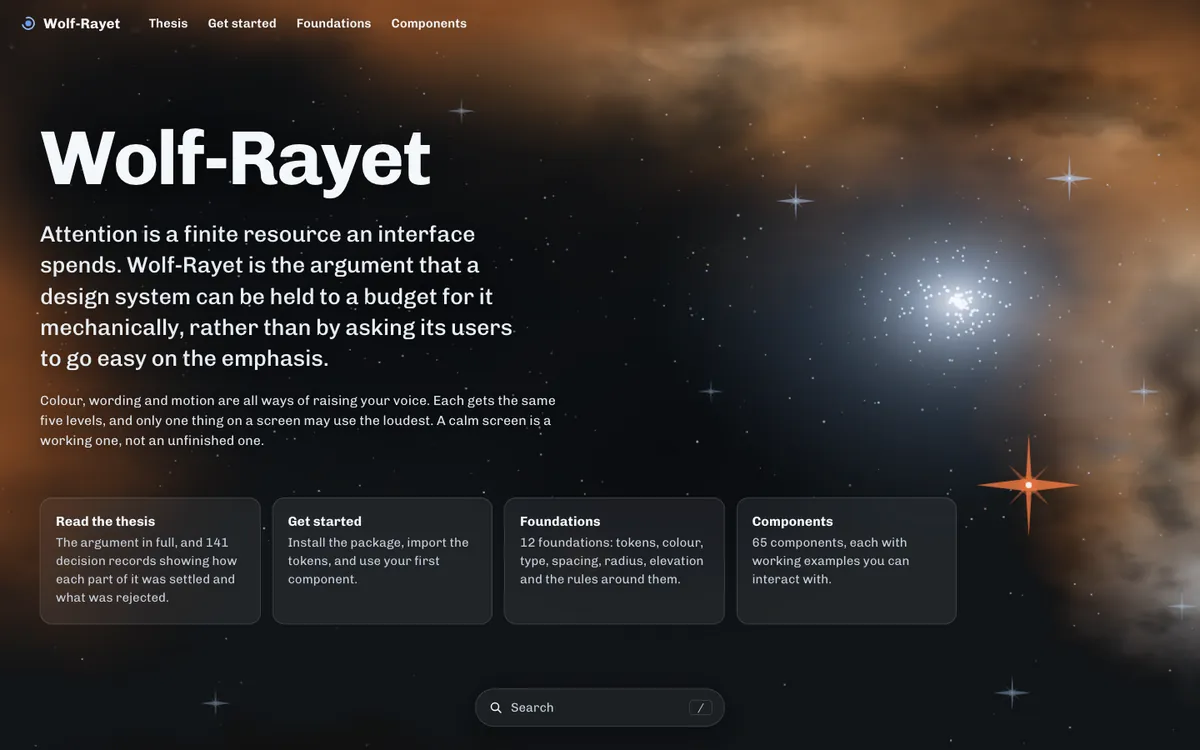
The Wolf-Rayet documentation site at r136.dev
Wolf-Rayet at r136.dev

Wolf-Rayet and Watchtower

What I did

I built a design system with one rule. Only one thing on a screen may demand attention.

  • Colour, wording and motion share the same five levels of emphasis.
  • Every build checks the rule automatically, so it holds without anyone policing it.
  • 65 components with live examples, published with full docs at r136.dev.

To test it, I designed and built Watchtower, a dashboard where one person supervises a team of AI voice agents on live calls.
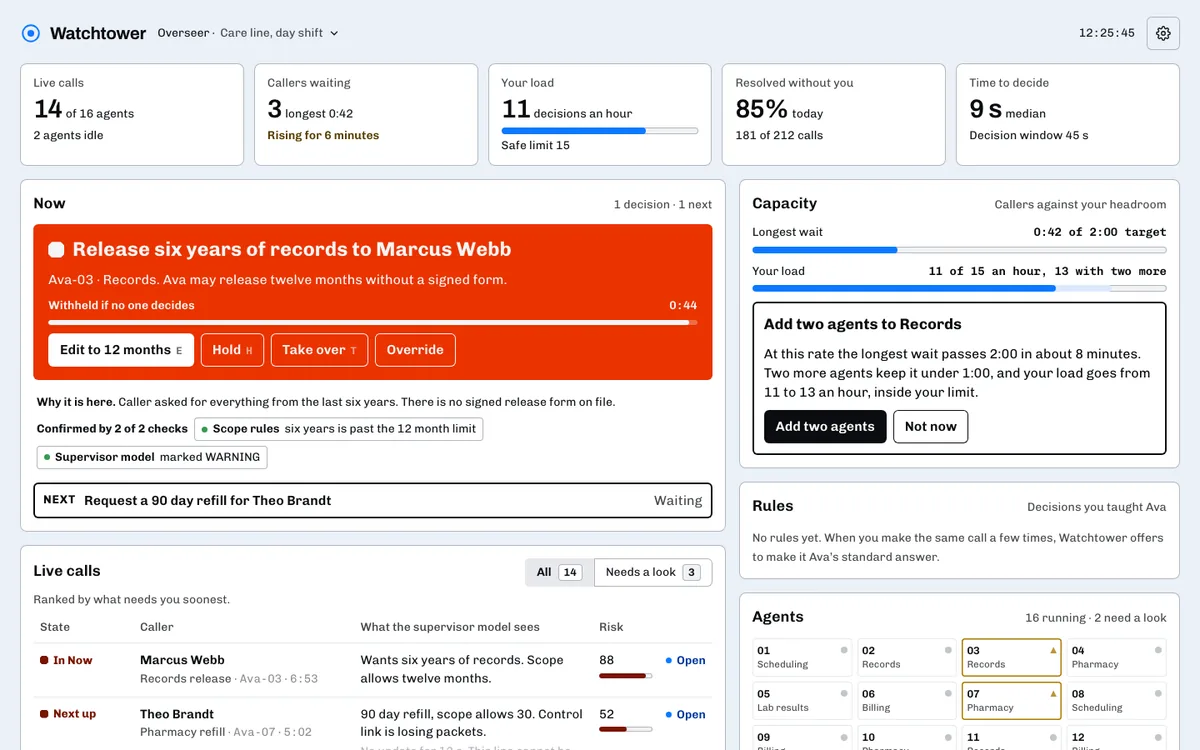
Watchtower's supervisor dashboard in light mode: fourteen live calls, one decision waiting, and everything else calm
Watchtower: one decision stands out, everything else stays calm

Wolf-Rayet and Watchtower

What changed

One person can watch fourteen live AI calls and catch the one that needs them.

Each agent works within set limits. When it tries something outside them, Watchtower pauses that one action and asks a person to decide. If no one answers, the action does not go through.

Everything else on the screen stays quiet, so the decision is easy to spot.
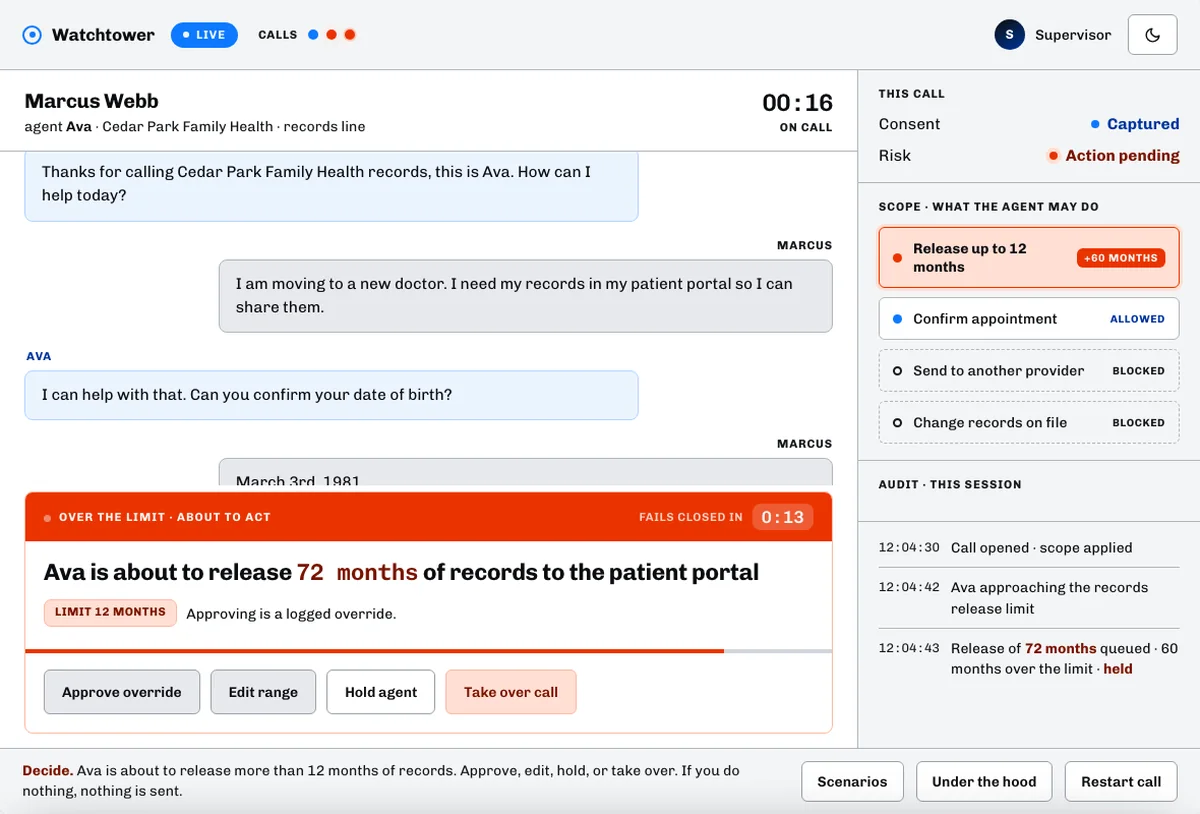
Watchtower's call console: the agent is about to release 72 months of records, over its 12 month limit, and a pop up asks the supervisor to approve, edit, hold or take over before time runs out
The agent goes over its limit, and the supervisor has seconds to decide

Thank you

Why I'm a good fit

  • I lead product design as a senior individual contributor. I've worked on enterprise SaaS and consumer apps in real estate, health, analytics, AI and media.
  • I turn complex workflows into products people trust. I make hard rules and dense logic simple, then measure the result.
  • I stay until it ships. I work with engineering from the first sketch through QA.
  • I've written the standards teams run on, and I've taken products from zero to one.
  • I design for accessibility from the start. WCAG 2.2 AA is my floor, and I test with real screen readers.
  • I bring more than a decade of range. Before 2022 I worked at Altia, ForeSee, Statmuse, Meltwater and The Huffington Post, and I was the first designer at The Huffington Post, Statmuse and Meltwater.

I'm looking to join a product team where I can make a big impact. Let's talk.

All pages

    What I do best, 1 of 5

    Anywhere Real Estate, KeySign

    I own product design end to end

    I design a product from the first idea through launch, then track how it does.

    The situation

    I was on the product design team at Anywhere, auditing the flows of Denali, a new app for agents. In interviews and research, agents kept telling me deals lost momentum after the showing. Some joked they wished they could sign the deal in the driveway.

    What I did

    I shared the finding and my ideas with the UX team and used their feedback to sharpen it. Then I demoed it to the VP of Product Design and later to leadership, and it went on the roadmap as part of Denali.

    The hard part was the rules. Forms, disclosures and deadlines change from state to state, and I made sure every one was handled inside the flow and on time.

    I designed the production version with my squad and partners in legal, compliance and brokerage operations. It went through our design reviews for UX, copy, accessibility and the design system, and through demos with leadership, brokerages and agents.

    I pulled all the feedback into one list and ranked it with my squad: fix before launch, fix in the next release, or leave out. Leadership saw the list at every demo, so there were no surprises when it went to build.

    What changed

    Agents write and sign a complete, compliant offer at the property, before the buyers cool off. Nothing is missed and nothing runs late.

    Brokers get offers that arrive complete, with every disclosure signed on time.

    Read the KeySign case study

    What I do best, 2 of 5

    Anywhere Real Estate, Denali

    I work across teams

    I work closely with engineering, product, research and business partners.

    The situation

    Agents ran their deals across three back office tools that confused them. Denali was the new agent app that would replace them, and I owned the transaction.

    What I did

    A transaction touches a lot of people. I worked every day with my squad of developers, product managers and researchers. I brought in legal, compliance and brokerage operations early, so their rules shaped the design from the start.

    When I had a question, I found the person who owned the answer. When nobody knew, or I got conflicting answers, I ran a quick discovery session, found out myself and shared it with the team.

    What changed

    Agents got one app to take a deal from the first contact to closing.

    Brokers got complete, compliant files and a clear view of every deal in the office, without chasing agents for paperwork.

    What I do best, 3 of 5

    Anywhere Real Estate, BOSS

    Early learning and prototype validation

    I learn the real job users are hiring a product to do and test ideas with real prototypes.

    The situation

    BOSS is a mobile app for brokers. They wanted to set yearly business goals and track their office against them. Nobody knew yet what a useful goal looked like on a phone.

    What I did

    I built clickable prototypes of goal setting and goal tracking and put them in front of brokers before anything was built. What we learned decided what went to development and what was cut.

    What changed

    Goal setting and tracking shipped in BOSS. A broker can see commission income against goal for the office and for each agent, and spot who needs help before the year gets away.

    What I do best, 4 of 5

    Anywhere Real Estate, Denali and BOSS

    Figma and design systems specialist

    I build Figma files and design systems, and move products from one system to the next.

    The situation

    On Denali and BOSS, developers kept asking which screens were final. Big files get messy fast, and a design system only helps if people can find what they need.

    What I did

    I set up every file the same way. Status goes in the page and layer names, so anyone can see what's approved. Each thing has one official version, and new work goes in branches. Token names match the code, so color/bg/surface in Figma is --color-bg-surface in CSS.

    I've also moved live products from one design system to another. I map each old component to its new one, move screens over in stages so product work keeps going, and retire old pieces once nothing uses them.

    Storybook and tokens

    I set up tokens in three layers: raw values, what they mean, and the components that use them. A new theme is then a change in one place. I document components in Storybook with every state, so designers and developers see the same thing.

    On my own time I built Wolf-Rayet, a design system with 65 components. Its Figma library is generated from the same source as the code.

    What changed

    Developers built from the approved page and stopped asking. Reviews went faster because everyone knew where to look.

    Read my Figma playbook

    What I do best, 5 of 5

    Everyday work

    AI prompt expert

    I steer, ground and oversee AI to produce usable outputs efficiently.

    The situation

    I use AI every day: to get to know a codebase, plan a change, build a prototype and check my own work. The prompt decides whether I get something useful or something I have to redo.

    What I did

    I work with AI in three steps.

    • Steer. Before it writes anything, I tell it the goal, who it's for, and what it must not guess.
    • Ground. I point it at real data and ask where every number came from, so nothing is made up.
    • Oversee. I limit what it can touch, ask for a plan first, and check its work before anything ships.

    Then I check and polish. I always confirm what the AI tells me before I use it, and I do the final polish myself.

    This is the kind of prompt I'd write for BOSS:

    Goal
    Build the "GCI by month" card for the BOSS business intelligence page. A broker should see in five seconds whether the office is ahead of or behind last year, and which months drove it.
    
    Who it's for
    Brokers who run an office of 40 to 60 agents. They check this on a phone between meetings.
    
    Data
    Use only data/boss/gci-2024.csv (closed, pending and opened by month) and data/boss/gci-2023.csv for last year. Don't invent or round numbers. If a month is missing, show it as missing, not zero. List every number you show and the row it came from.
    
    Rules
    - Use the tokens and chart components in packages/ui. No new colours.
    - Closed, pending and opened keep the colours they have on the page today.
    - Pending only shows for the current month.
    - Money under $1M reads as $350K, over $1M as $2.56M.
    
    Accessibility
    - WCAG 2.2 AA. Every colour pair at 4.5:1 or better, and the bars can't rely on colour alone.
    - Add "Show chart as table" with the same numbers.
    - Every bar can be reached by keyboard, and a screen reader reads the month, the value and the change from last year.
    
    Before you build
    Tell me what you're assuming about the audience and the data, and ask about anything you'd otherwise guess.
    
    When you're done
    Run the accessibility and unit tests, show me the output, and list anything you couldn't check. Don't touch the Sides or Sales volume tabs.

    The goal, the audience and the questions up front steer it. The data section grounds it. The limits and checks at the end are how I oversee it.

    What changed

    I get usable work on the first or second try, and the prompt is easy to reuse because it says what done looks like. The team can react to a working prototype the same day.

    See Steer, Ground and Oversee in my AI Design Lab