Say When: helping older adults avoid missed and double doses
Older adults take more prescription medicines than any other age group. Missing a dose or taking one twice can put them in the emergency room. Say When is an iPhone and Apple Watch app that keeps a person’s medicines and appointments in one schedule. Setup reads each pharmacy label and turns its directions into times the person confirms. After that, Say When checks before a dose is marked twice and adjusts reminders around appointments like a fasting blood test.
Context
My own product, for older adults and the family who help them
My role
Product designer and design technologist. I did the research, designed both apps and built them
Built with
SwiftUI, with one Swift package for the day’s logic that both apps share
Runs on
iPhone and Apple Watch, plus the watch face and the iPhone lock screen
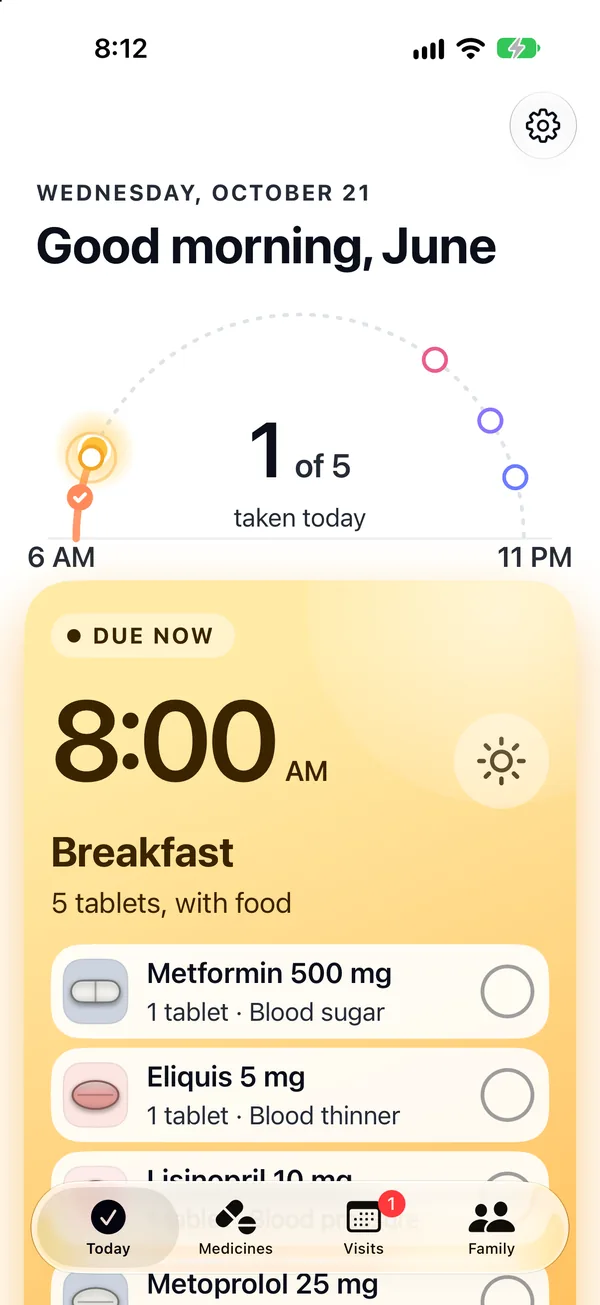
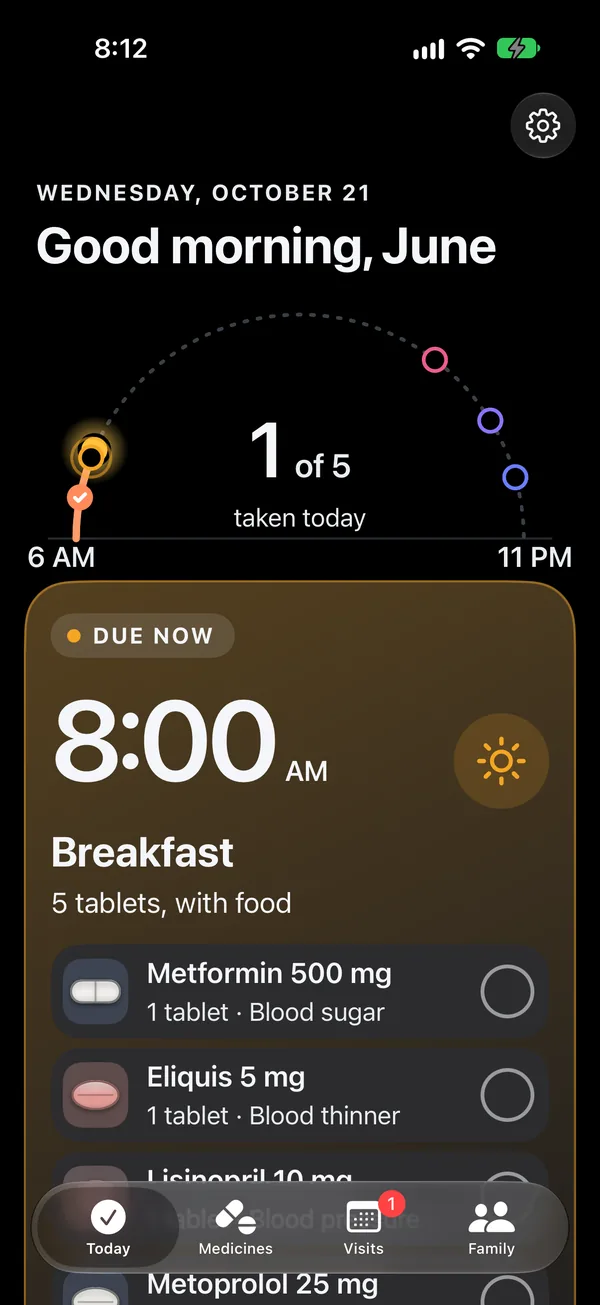
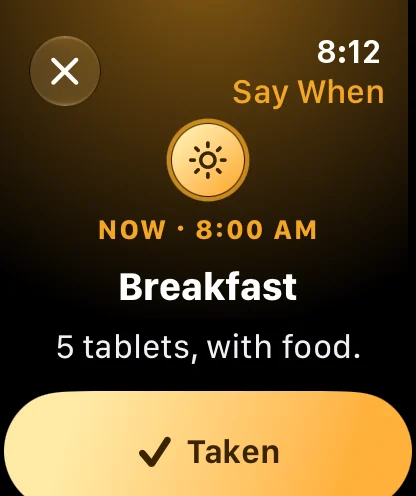
Breakfast is due. One tap on the phone or the Watch marks all five tablets.
Taking several medicines a day is easy to get wrong
Four in ten adults over 65 take five or more prescription medicines. Each one has its own schedule and its own rules about food.
That leads to two common mistakes. A dose gets missed when the day doesn’t follow its usual pattern. Or a dose gets taken twice because the person can’t remember if they already took it. With a blood thinner or a diabetes drug, either mistake can lead to a hospital visit.
Appointments cause a third problem. Before a fasting blood test, some morning tablets have to wait until after the draw and some don’t. Those instructions come from the doctor’s office, and medication reminders don’t account for them.
Reminder apps already exist. Apple’s Health app has had medication reminders, follow-up reminders and Critical Alerts since iOS 17. But it keeps medicines and appointments separate. It can share a medication list with family, but Apple’s documentation doesn’t describe any alert to family when a dose is late.
of adults 65 and over took five or more prescription drugs in 2017 to 2020, up from 33.3% in 2001 to 2004.
CDC, Health, United States, from the national health survey
of emergency room visits for harm from a medicine were adults 65 and over. 43.6% of them were admitted to the hospital.
Shehab et al., JAMA 2016, 58 US emergency departments, 2013 to 2014
of medicine mistakes reported to US poison centers in 2024 were a dose taken twice by accident, the most common mistake on the list.
National Poison Data System, 2024 report, 361,402 cases
of outpatients arrived properly prepared for a blood test. Only 39% knew what fasting meant.
Kackov et al., Biochemia Medica 2013, 150 adults
Taking medicines as prescribed also matters over time. A 2019 review of studies in older adults linked missed doses to more hospital stays, and linked taking medicines as prescribed to a 21% lower long-term risk of death.
What this evidence doesn’t show. The poison center figure covers all ages, and the blood test figure comes from one clinic in Croatia. Cost isn’t the main reason older adults skip doses: 3.4% of adults 65 and over didn’t take medicine as prescribed because of cost in 2021 to 2022. I left out the often-quoted claim that missed doses cause 125,000 US deaths a year, because I couldn’t verify it in the original source.
What the design had to work within
Most of these limit what the app can say about medicine and when it can interrupt someone.
It can’t give medical advice
The FDA treats apps that track medicines and send reminders the user sets up as low risk. An app that tells someone to change a dose is regulated differently. So every instruction in Say When comes from the prescriber, the pharmacy label or the lab, and says which. FDA guidance on device software, 2022, Appendix B
Reminders can be silenced
Time Sensitive notifications get through Focus modes, but the user can turn that off. Critical Alerts play even when the phone is muted, but Apple has to approve each app that sends them. Apple developer documentation on Time Sensitive and Critical Alerts
Apple Health already sends reminders
Rebuilding Health’s reminders would add nothing. Since iOS 26, other apps can read the medicines a person keeps in Health, so Say When imports that list. Health shares which medicines a person takes, not when, so Say When reads the times from each label. Apple, WWDC 2025, read access only
Reading with older eyes
Medicine names and instructions start at 19 points and grow with the iPhone’s text size. Main buttons are at least 60 points tall. Each time of day has its own color, and nothing is shown by color alone.
Help from family, not monitoring
Family involvement can easily become monitoring. June decides what Kate is told and can see every message Kate gets. Kate can’t change anything.
Health data stays on the device
No account, no ads and no tracking. Labels are read on the phone, and the only thing that leaves it is a medicine’s name, checked against the US national drug list, RxNorm.
Three decisions that shaped it
Each decision had a cost. It’s listed at the end of each card.
Read the label’s text, not its barcode
What I chose
Setup brings in the list from Apple Health, then the camera reads each pharmacy label’s printed text. Say When checks the drug name against the national drug list and turns the directions into times June confirms.
What else I considered
Scanning the barcode, which is faster. Or typing each medicine in, which is how most reminder apps start.
Why
Pharmacy labels have no standard barcode content, and some only hold the pharmacy’s prescription number. The printed text always has the drug, the strength and the directions. Typing long drug names on a phone is where mistakes start.
What I gave up
Speed. Reading text takes a moment longer and can misread in poor light, so every line goes in front of June before it’s saved.
One schedule for medicines and appointments
What I chose
Medicines and appointments share one schedule. When a lab asks for fasting, that morning’s reminders change to match, and the office’s instructions are shown word for word.
What else I considered
A reminder app alongside a calendar. That’s how most people manage today, and how Apple’s Health and Calendar apps work.
Why
The conflict only shows up when both are in one place. A metformin reminder at 8:00 AM is wrong on a fasting morning.
What I gave up
A longer setup. Someone has to enter the office’s instructions, and Say When can only apply what it’s given.
A check before a second dose
What I chose
The Watch and the phone show what was taken and when. Marking a dose that’s already marked asks for confirmation first, on both devices.
What else I considered
A Watch app that only sends reminders, with the history kept on the phone.
Why
Taking a dose twice is the most common medicine mistake reported to US poison centers. I designed for June wearing her watch with her phone in another room.
What I gave up
An extra tap when a second dose really was taken. Say When records it and shows the pharmacist’s number, but doesn’t tell June what to do.
June’s medicines and her two days
Every screen on this page follows the same two days.
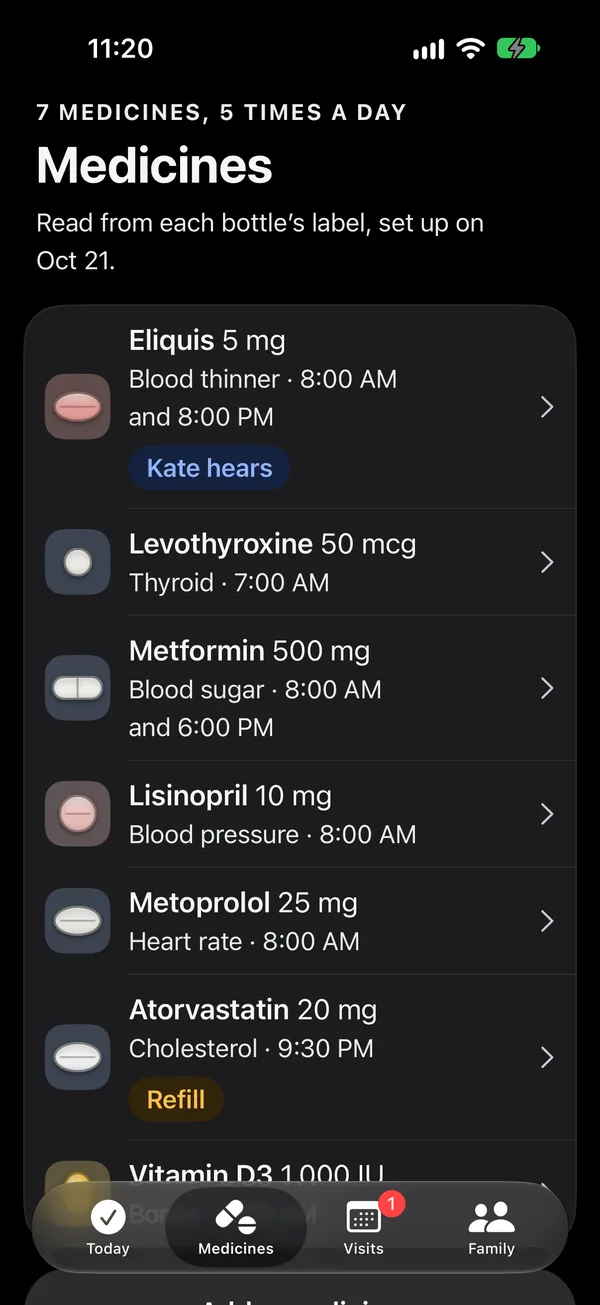
June takes seven medicines at five times a day. On Wednesday her evening blood thinner is late. On Thursday at 8:30 AM she has a fasting blood test her doctor ordered.
June Ito, 79. Lives alone in Sunnyvale. Wears an Apple Watch her daughter gave her and keeps her phone in the kitchen.
Kate Ito, her daughter. Lives in Oakland. Helped June set up Say When, one pill bottle at a time. Hears about the blood thinner only.
| When | Tablets | On Thursday, the test day |
|---|---|---|
| 7:00 AM, on waking | Levothyroxine, for her thyroid, on an empty stomach | No change |
| 8:00 AM, breakfast | Metformin, Eliquis, lisinopril, metoprolol and vitamin D | Split in two. Eliquis, lisinopril and metoprolol at 7:45 AM with water. Metformin and vitamin D with breakfast once the test is done |
| 6:00 PM, dinner | Metformin | No change |
| 8:00 PM | Eliquis, her blood thinner, 12 hours after the morning dose | No change. If it’s an hour late, Kate is told |
| 9:30 PM, bedtime | Atorvastatin, for cholesterol. Four tablets left | No change, plus a reminder to order a refill |
Seven moments across June’s two days
Say When on the iPhone and the Apple Watch, each screen at the time its moment happens.
Setup · 10:30 AM
Setting up from the pill bottles
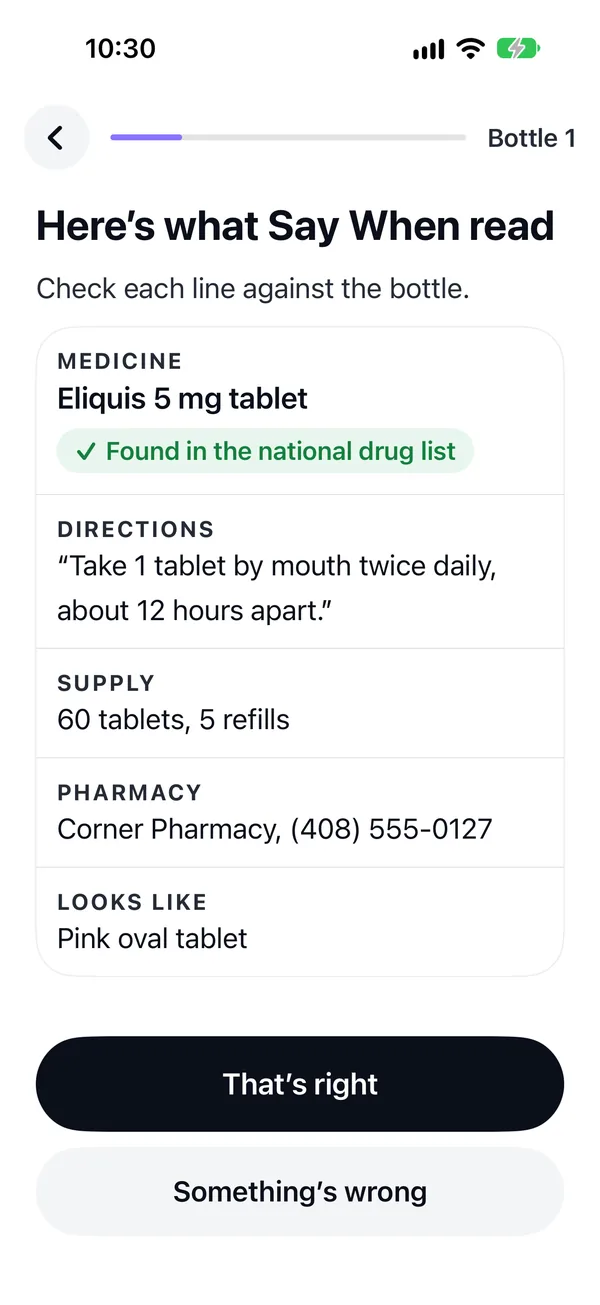
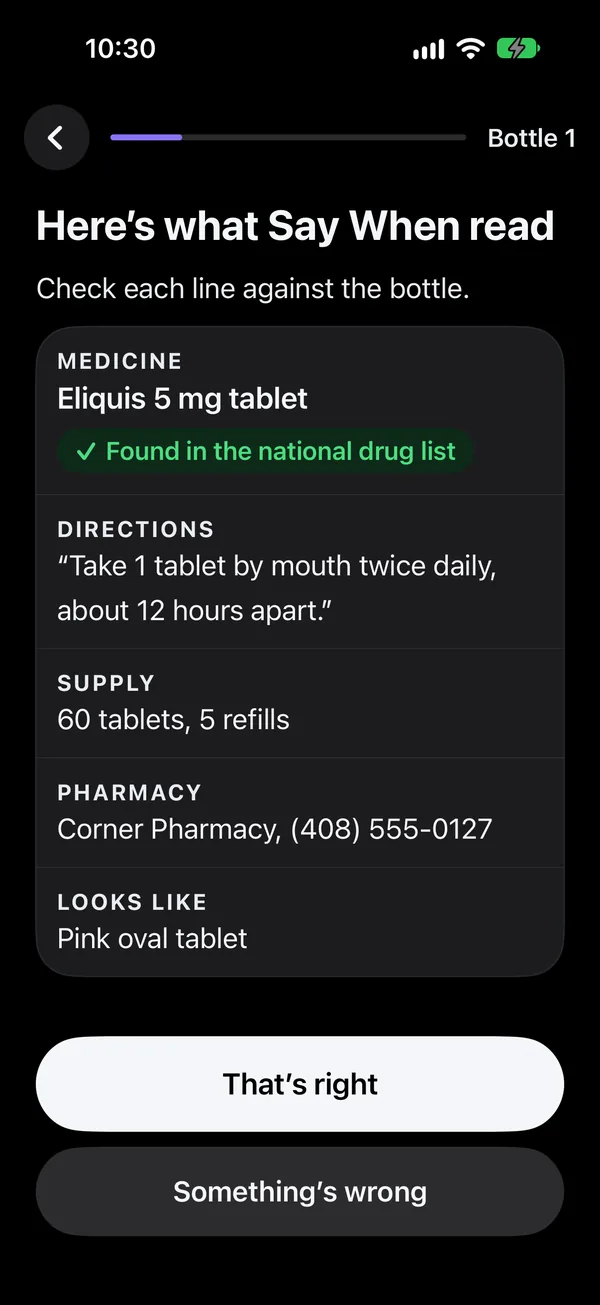
Kate and June set Say When up together at the kitchen table. Medicines come in from Apple Health. Then June holds each bottle up to the camera, and Say When reads the label. A photo of the label works too, and so does typing it.
Every line Say When read waits for June to check it against the bottle, and the name is checked against the national drug list. Clear directions become times: “twice daily” ticks breakfast and evening. Vague ones, like “once daily”, tick nothing and ask. June can tick any time of day on or off before the medicine is added.
Setup ends with her doctor, her pharmacy, the visits coming up and who hears what, then the whole day on one screen to show her pharmacist. The Watch fills in as each bottle is added.
Wednesday · 8:12 AM
Breakfast is due
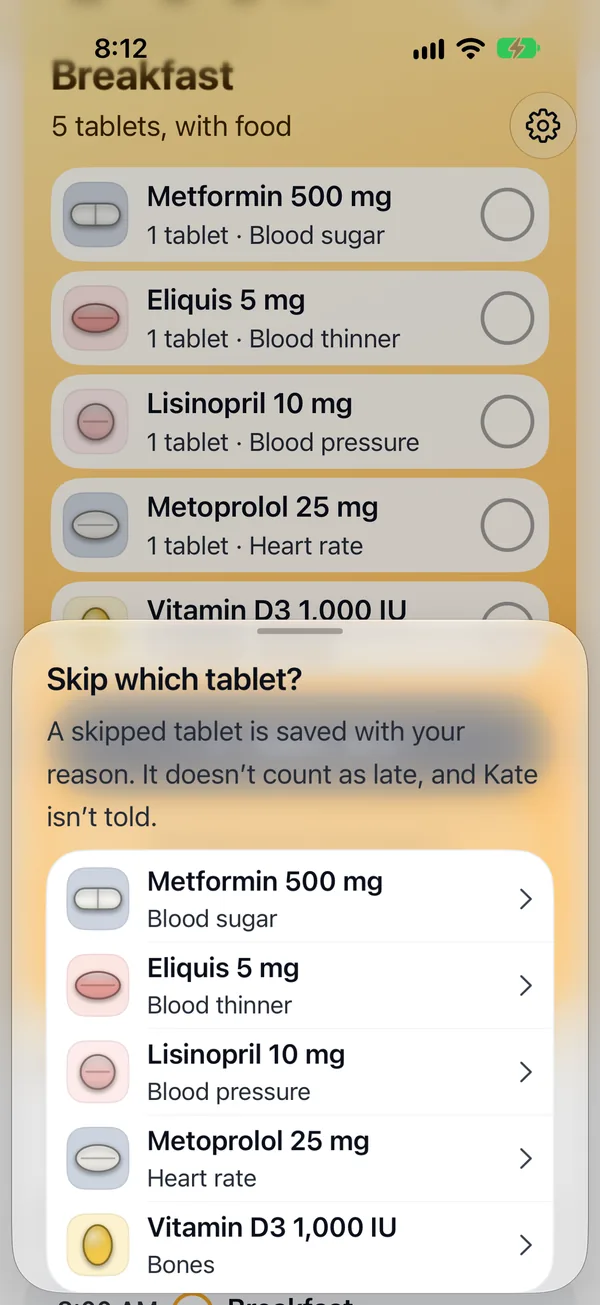
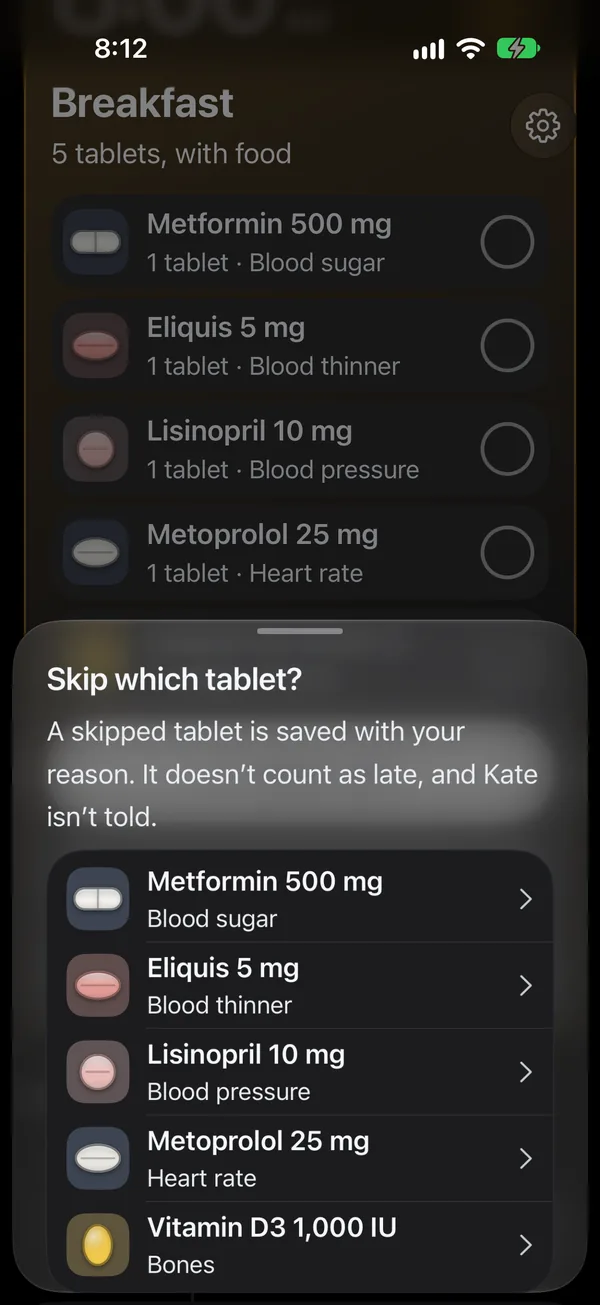
The five breakfast tablets share one card. One tap marks them all, on the phone or the Watch, or June can mark each tablet on its own on the phone. Every mark can be undone.
“Remind me in 10 minutes” puts the card off. “Skip a tablet” asks why: my doctor told me to, I’ve run out, I don’t feel well enough, or another reason. A skip is a decision, not a miss, so it never makes the dose late and Kate is never told about it.
Wednesday · 11:20 AM
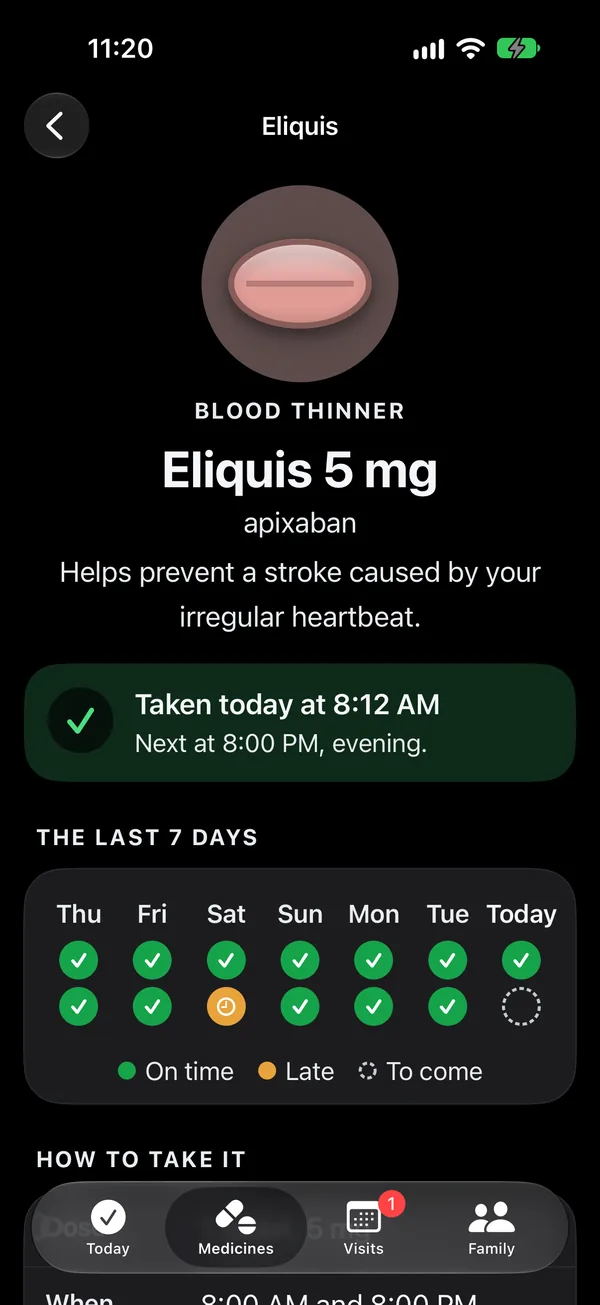
Was it already taken?
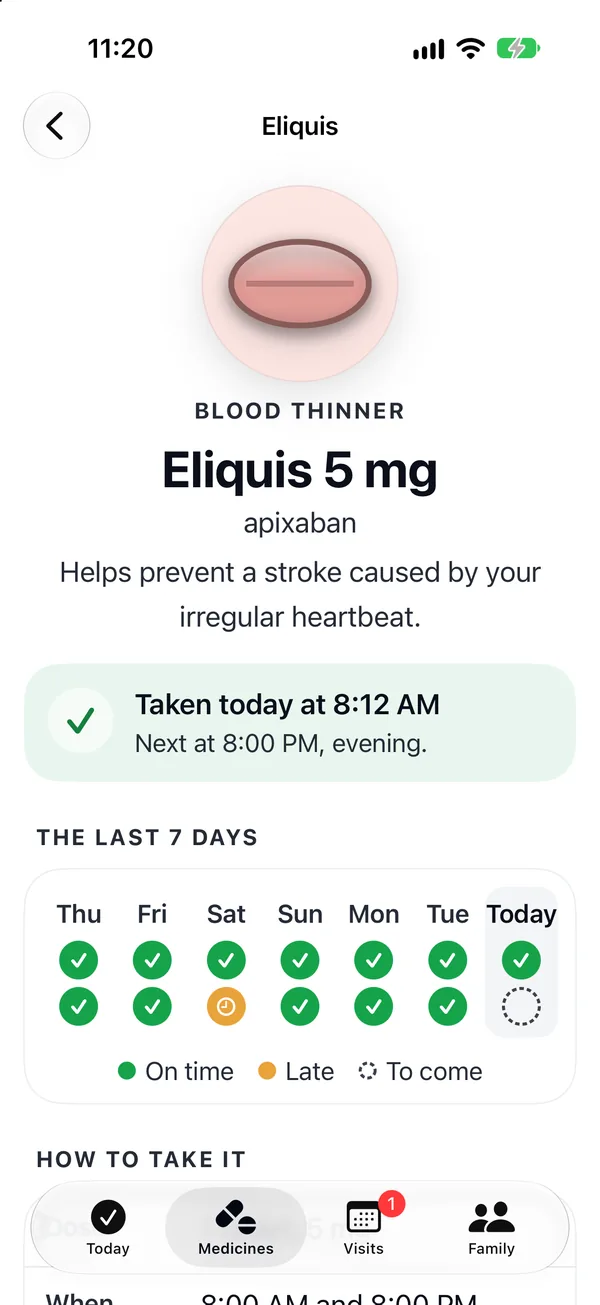
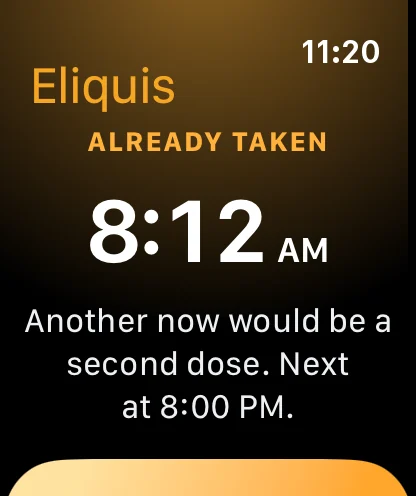
June isn’t sure she took her blood thinner. The Eliquis page shows it was taken at 8:12 AM, the next dose at 8:00 PM and the last seven days, with how to take it and whose words those are.
Tapping Eliquis again on the Watch asks first and says when it was taken. If she did take another, Say When records it and shows her pharmacy’s number. It doesn’t tell her what to do.
Wednesday · 9:00 PM
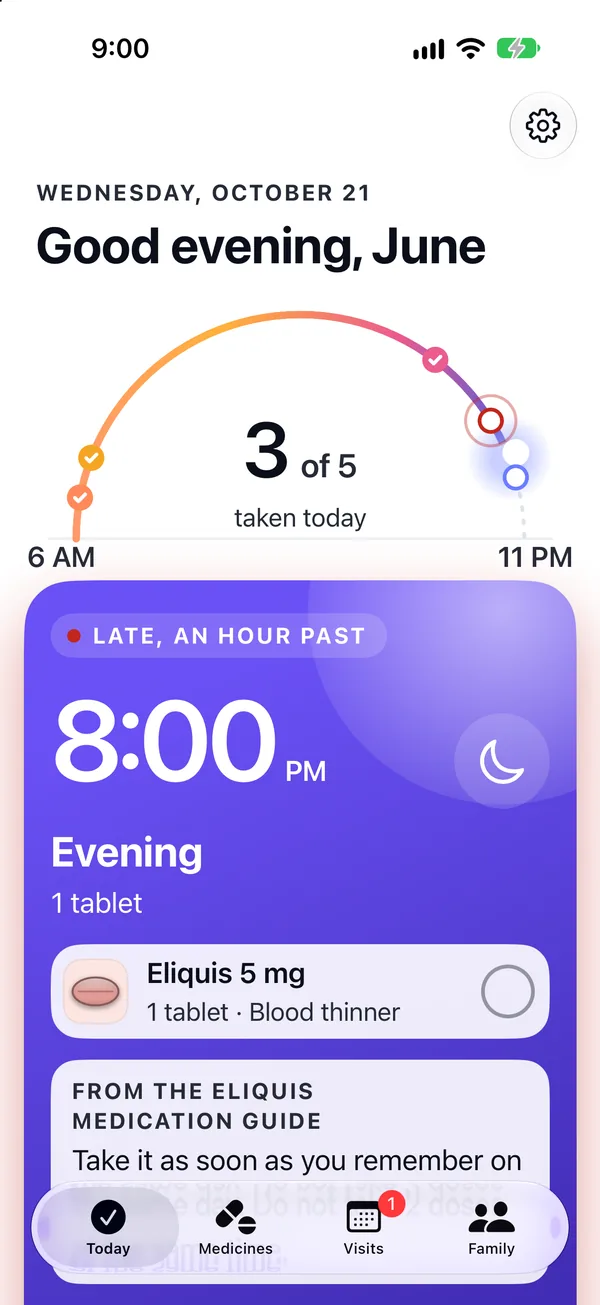
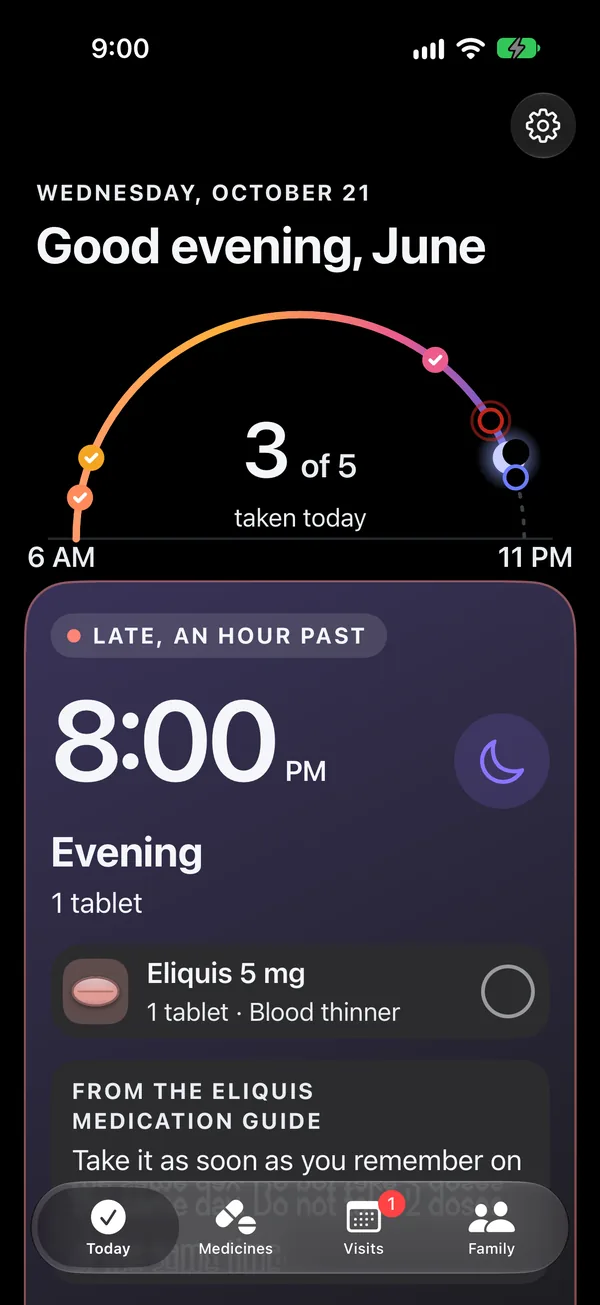
An hour late
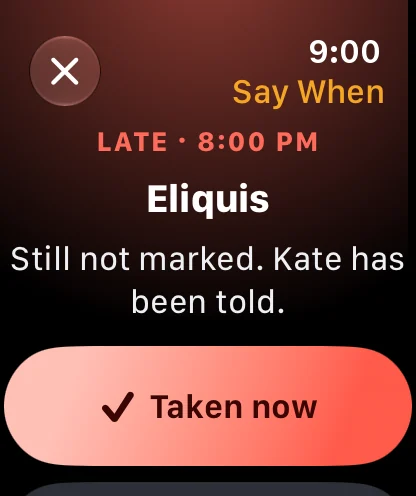
The evening Eliquis was due at 8:00 PM. At 8:30 PM the Watch reminded June again. At 9:00 PM it still isn’t marked, so the card shows the medication guide’s own words for a missed dose, and the Watch offers Taken now.
If June took it at 8:00 PM and only forgot to mark it, “I took it at 8:00 PM” records it on time.
Wednesday · 9:00 PM
Kate hears about one medicine
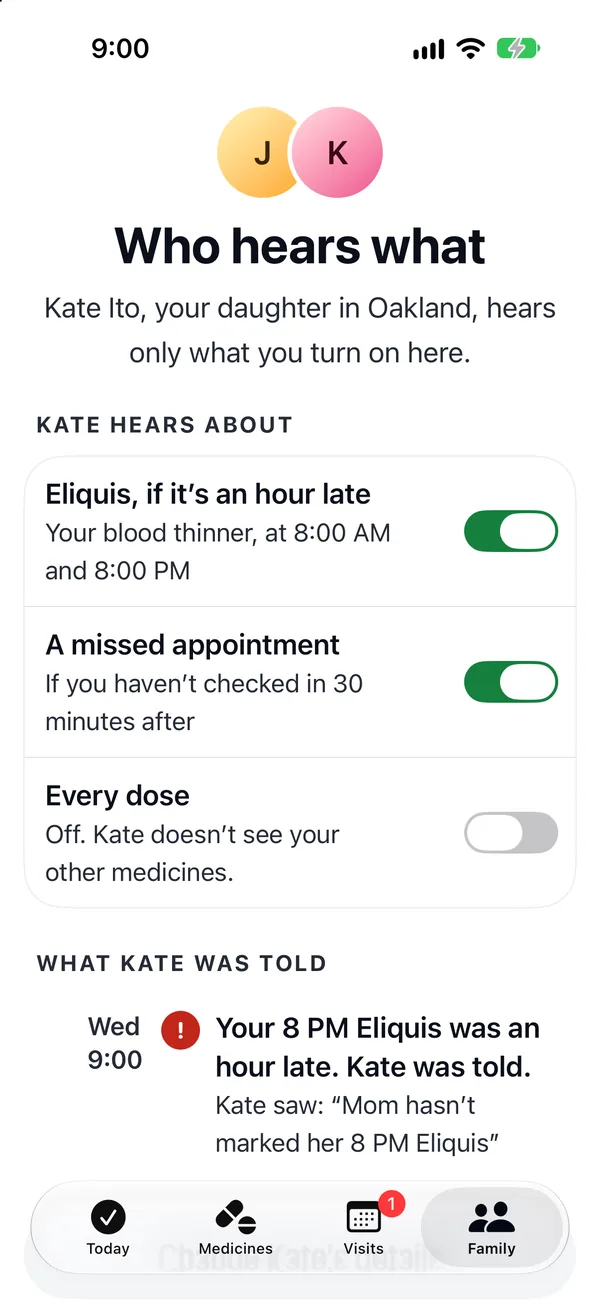
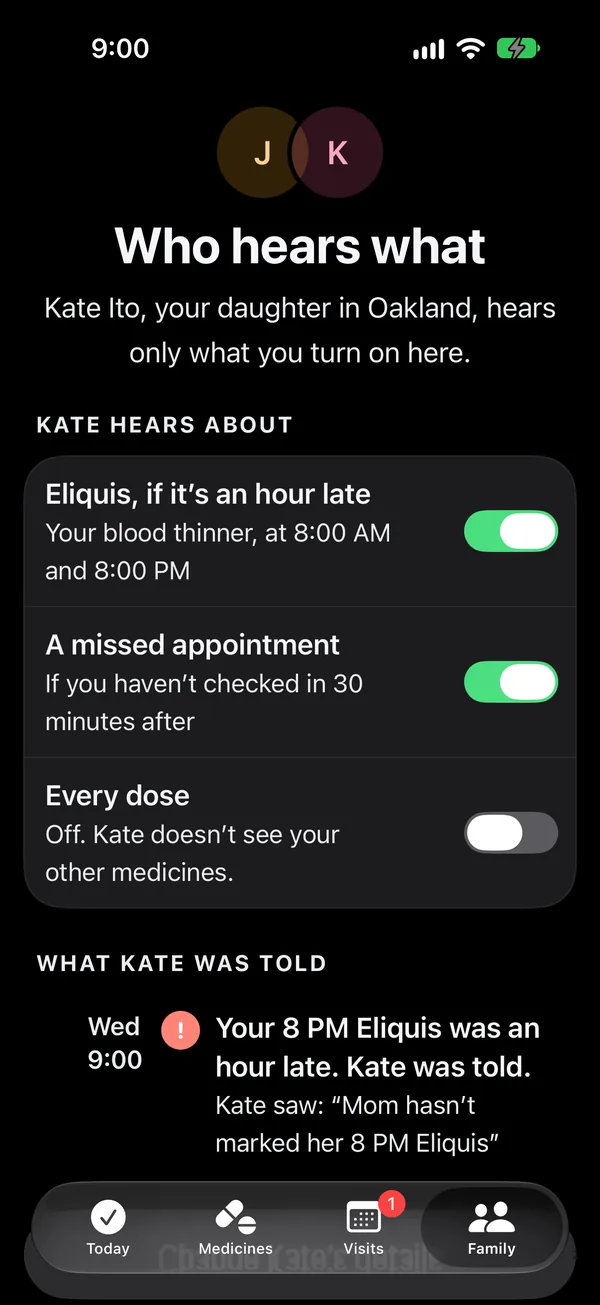
At 9:00 PM Kate gets one message: “Mom hasn’t marked her 8 PM Eliquis”. She hears nothing about the vitamins, the skipped tablets or the doses taken on time.
June chooses what Kate hears: the blood thinner if it’s an hour late, a missed appointment, or every dose, which is off. Every message Kate was sent is listed on June’s own phone, word for word.
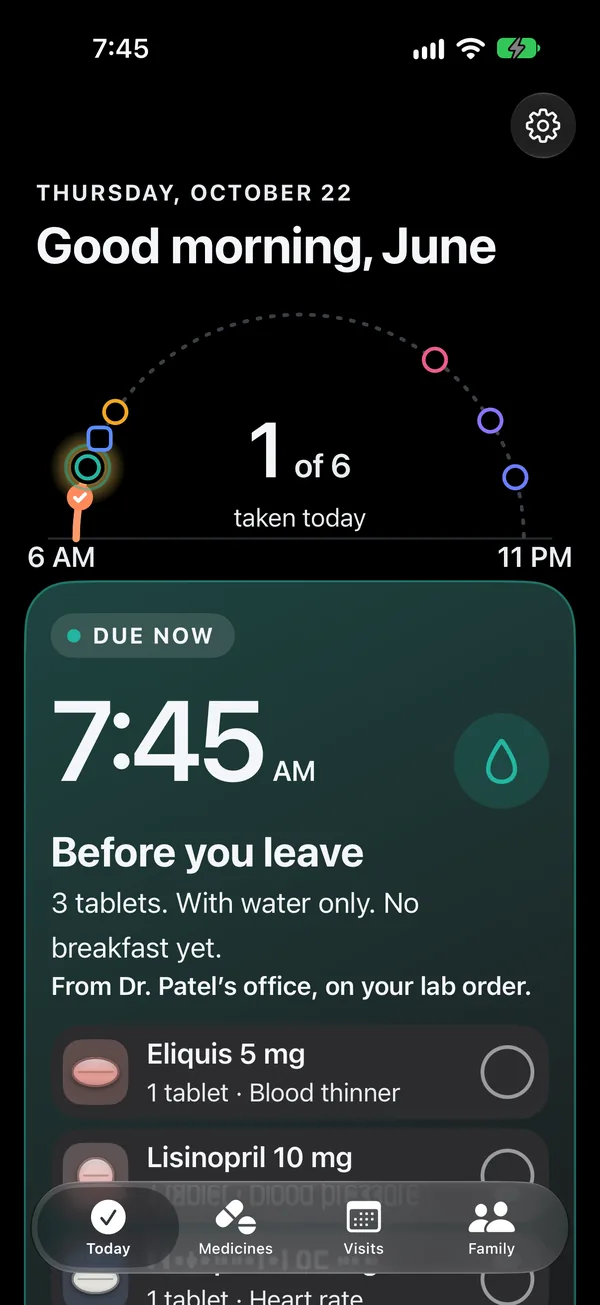
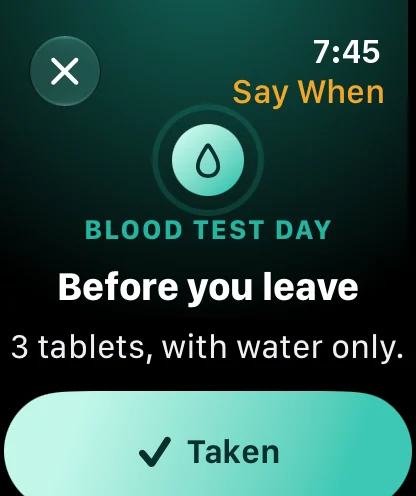
Thursday · 7:45 AM
The blood test morning
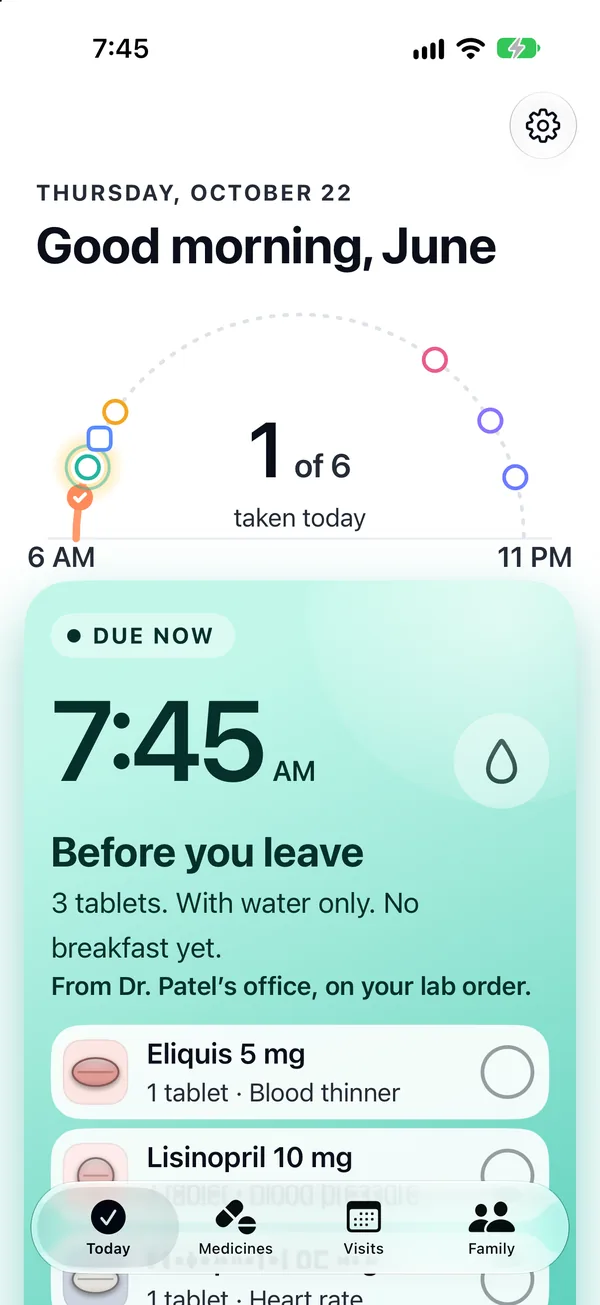
The night before, the Watch told June when to stop eating. This morning, breakfast is already split: three tablets now, with water, and two once the test is done.
The after-test tablets come due when June marks the test done, not at a set time, because she can’t know how long the lab will take. The card says the instruction is from Dr. Patel’s office, on her lab order.
Wednesday · 9:00 PM
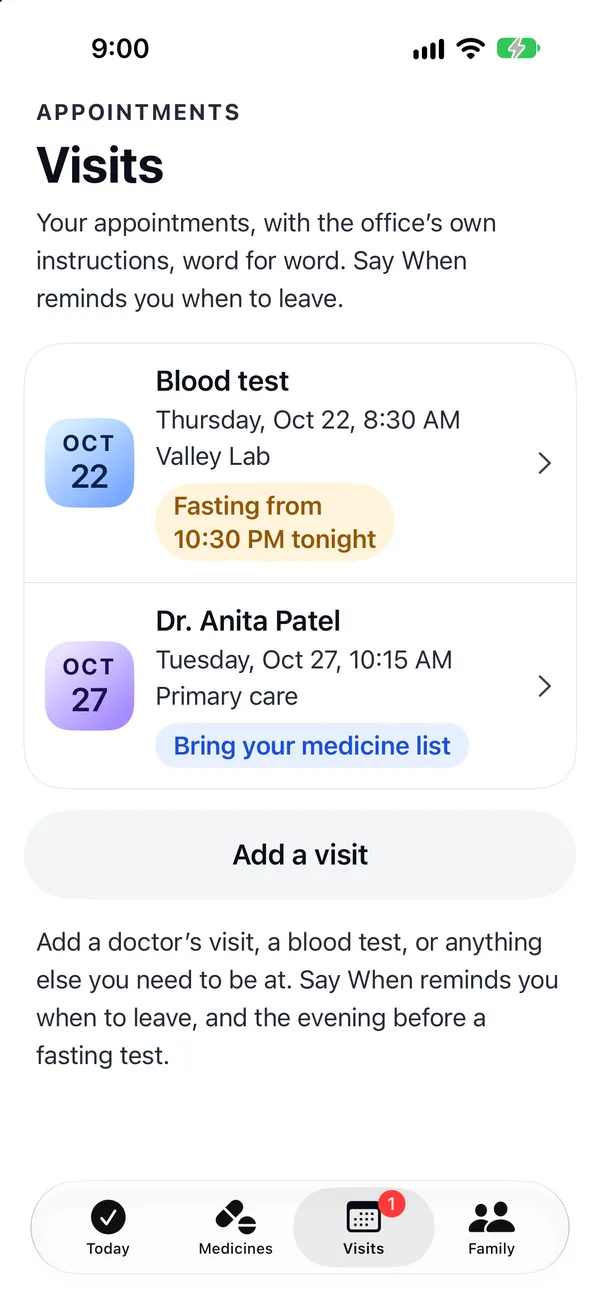
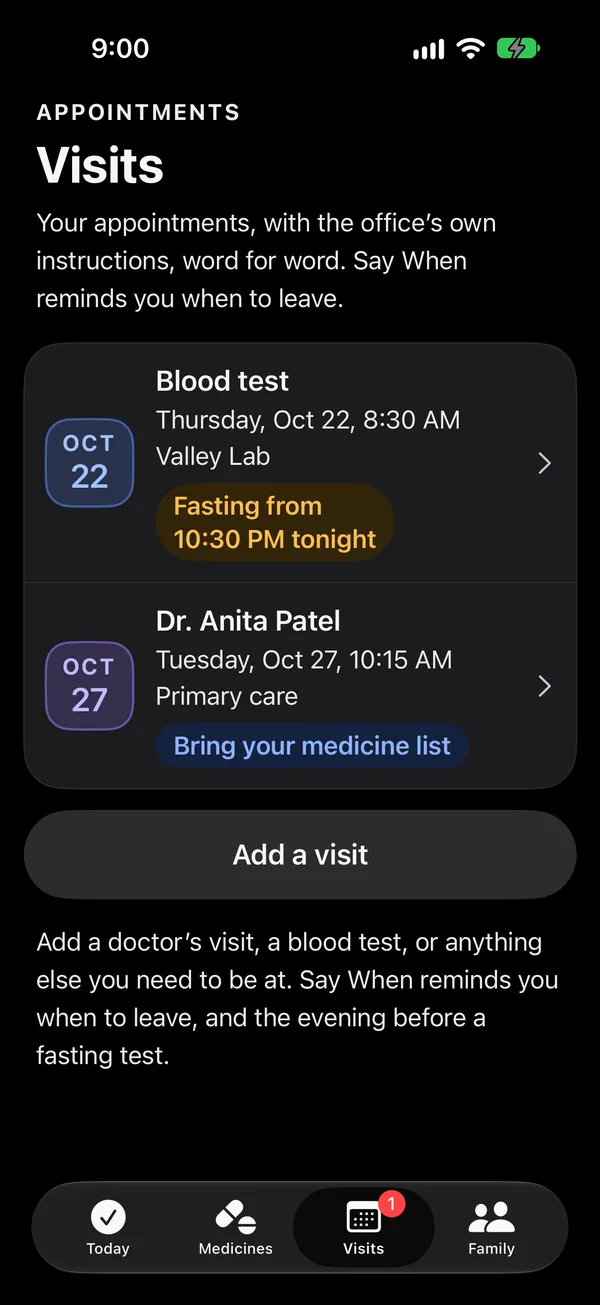
Visits, with the office’s own words
Doctor visits, blood tests and anything else June needs to be at live on their own tab. A blood test carries its fasting hours and the lab’s instructions word for word. Each visit has the time it takes to get there, so Say When knows when to tell her to leave.
Two hours before, Today shows the visit with what to bring and a button to check in. The tab wears a badge the day before.
On the iPhone and the watch face
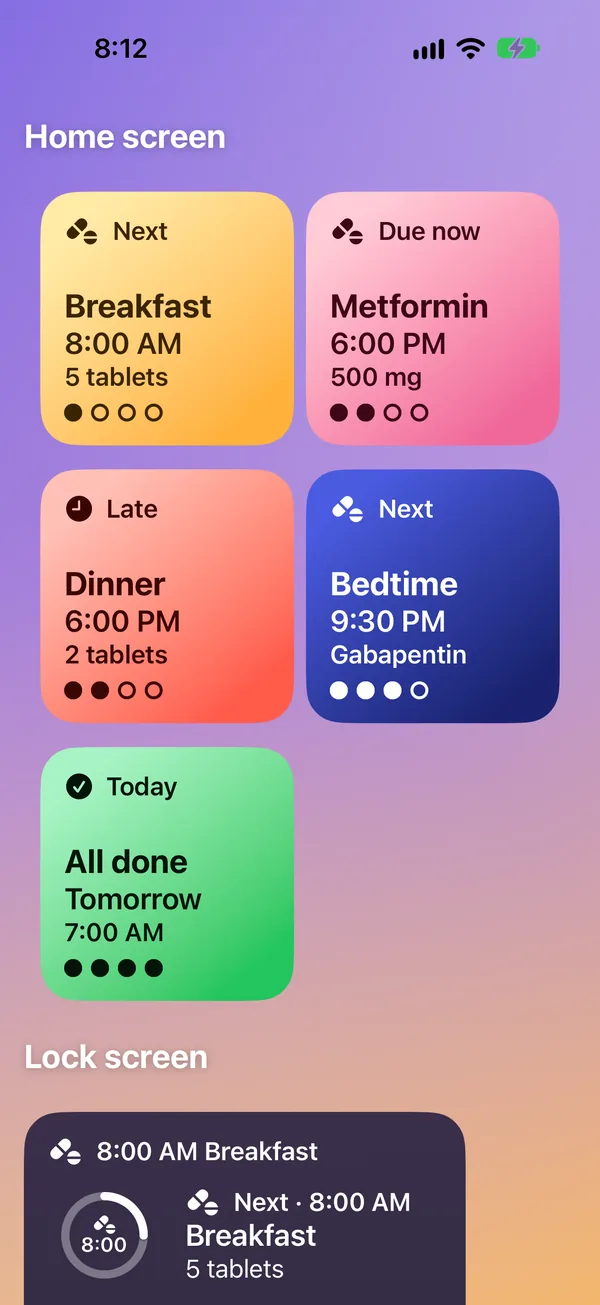
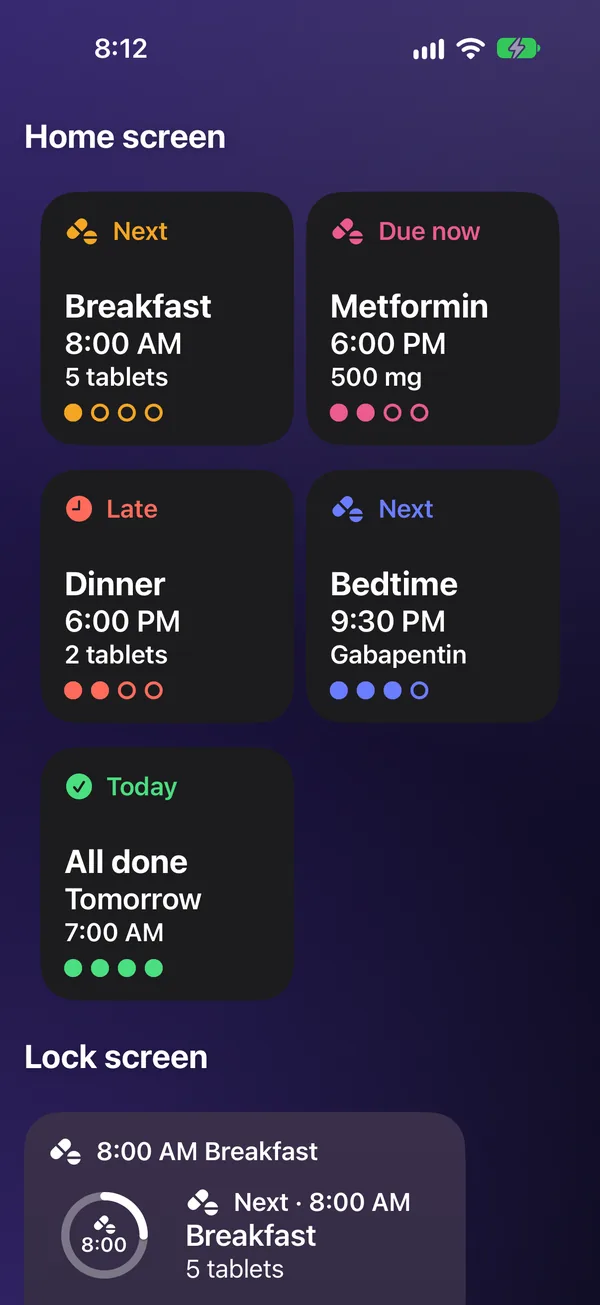
Did I take it? Without opening the app
Next dose widgets for the home screen and the lock screen answer that at a glance: the next time of day and its tablets, Due now, Late, or All done with when tomorrow starts. A row of dots fills as the day’s times are done. The widgets only show; marking stays in the app, so nothing is recorded by accident.
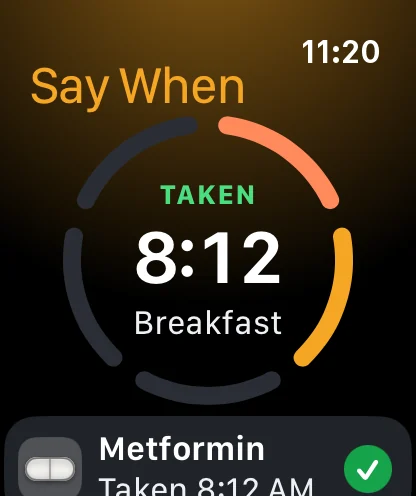
The Watch keeps the same day as a ring, and its Next dose complication sits on the watch face in four sizes.
Medicines
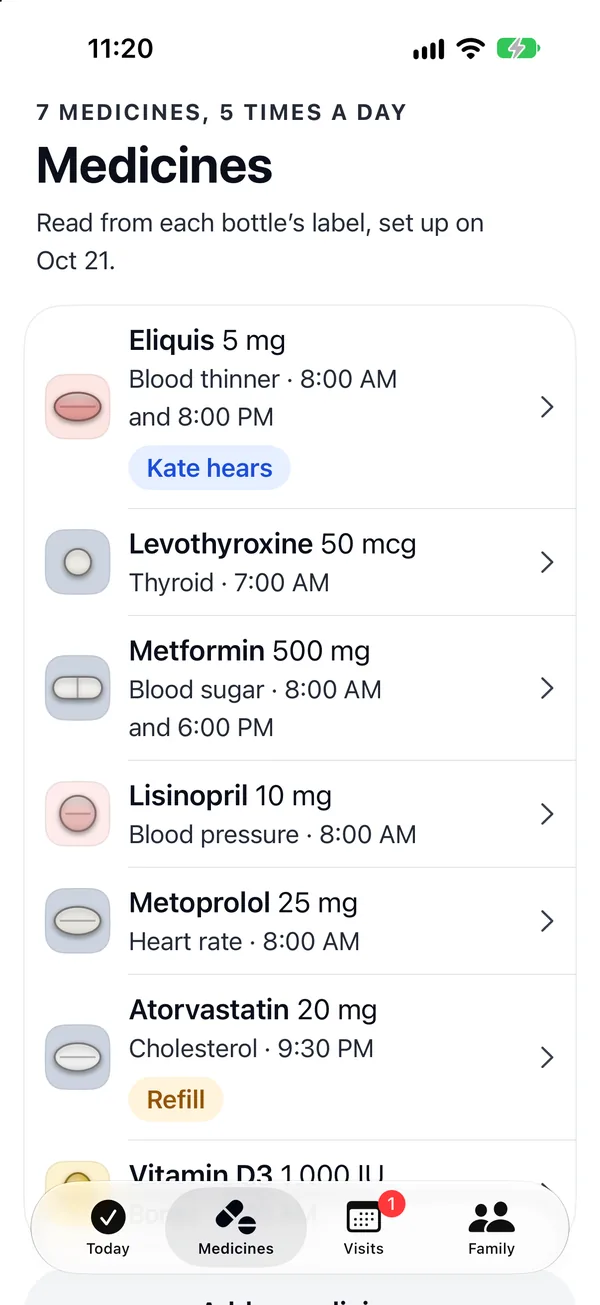
When the doctor changes a dose
Say When never changes a dose. When the doctor or pharmacist does, June or Kate opens the medicine and taps Scan the new label, which reads just that one bottle, or Stop taking it, which asks first. Change times moves a medicine to other times of day without scanning again, and Add a medicine brings in a new bottle.
The rest of the plan, and every dose already marked, stays as it was. Refills count down as doses are marked, and a medicine running low says so before it runs out.
Reminders that get through
Due, again and leave-by reminders are Time Sensitive, so they get through Focus. Each has Taken and In 10 minutes. A reminder swiped away records nothing.
One model, two apps
June’s plan, the day’s logic, the rule for Kate and the reminders live in one Swift package both apps share. Each device sends the other every change, so a dose marked on both is kept once.
On the watch face
A Next dose complication, in four sizes, shows the next time in its color, or Due now, Late or All done. It redraws after every mark.
Checked for access
UI tests drive both apps through the two days. Xcode’s accessibility audit runs on the main screens, in light and dark, and text grows to the largest accessibility sizes.
The note in the app, word for word.
“Say When shows what your prescriber, your pharmacy label and your lab say, word for word. It doesn’t give medical advice. If something doesn’t look right, or you’re not sure what to do, ask your pharmacist or doctor.”
What goes on the Watch and what goes on the phone
I assumed June wears her watch all day and leaves her phone in one place.
So the Watch handles anything that needs a quick answer: a dose is due, a dose was already taken, a dose is late, or it’s time to stop eating. Each Watch screen asks one question and has one main button.
The phone handles anything that needs reading, like setup, the plan for a test morning and what Kate is told. Both devices show the same day, so June can switch between them without losing her place.
Reminders
Time Sensitive notifications, so reminders get through Focus modes. The iPhone schedules them, and a Watch without its phone schedules its own.
The medicine list
Brought in from Apple Health where it exists, with permission for each medicine. Each label is then read for its directions, and nothing is typed unless the camera can’t read one.
The Watch
A standalone Watch app that keeps the day’s schedule on the watch, so it can answer whether a dose was taken even when the phone is out of range.
Kate’s message
Sent only when one of June’s rules is triggered. No other health information leaves June’s devices.
Ideas I considered and left out
Each of these came up while I was designing Say When. These are the reasons I left them out.
Scanning the barcode
Pharmacy labels have no standard barcode content, and some carry only the pharmacy’s prescription number. A barcode can’t be relied on to fill in the medicine or the directions.
Typing each medicine in
Long drug names on a small keyboard are easy to get wrong. Typing stays as a fallback for the rare label the camera can’t read.
A caregiver dashboard with every dose
If Kate sees every vitamin, help becomes monitoring, and June has less reason to keep marking doses. June chooses what Kate hears about instead.
Photographing each tablet
A photo before every dose adds a step each time and fails in poor light. One tap to mark, with a check before a second dose, does the same job faster.
A connected pill dispenser
A dispenser can confirm a dose physically, but it costs money, needs setting up and refilling, and only works at home. Say When works with the bottles June already has.
Counting a dismissed reminder as taken
Say When only records a dose when June marks it. The check before a second dose depends on an accurate record, so it never assumes.
Streaks and rewards
A streak rewards an unbroken run, so one missed dose can feel like failure. The seven-day view shows a plain record instead.
Alerting emergency services
A late dose isn’t an emergency on its own. Alerts stop at the one family member June chose, who can call her.
AI answers about missed doses
Telling someone what to do about a missed dose is medical advice. Say When shows the medication guide’s own instruction and the pharmacist’s number.
What success means: fewer missed doses and no double doses
These are the targets I measure Say When against.
| What is measured | Target | Why this number | If it’s missed |
|---|---|---|---|
| Labels read correctly on the first scan | 9 in 10 | Each correction slows setup down, and a misread June doesn’t catch becomes a wrong reminder. | Find which labels fail, like curved vials or small print, and add guidance for those. |
| Doses marked within an hour of their time | 9 in 10 | One hour is also when Kate is told, so both measures use the same definition of late. | Find which times of day run late, and move those reminders to fit June’s routine. |
| Second doses stopped by the check, compared with second doses recorded | More stopped than recorded | The check is meant to prevent double doses, not just record them. | The check is coming too late. Show the last dose time on the watch face. |
| Blood tests repeated because of preparation | Zero | The test morning plan exists to prevent this. A repeated test means another morning of fasting and another needle. | Show the lab’s instructions again the evening before, word for word. |
| Alerts to Kate when June had taken the dose but not marked it | Fewer than 1 in 5 | If Kate gets too many false alerts, she’ll start ignoring them. The option to say “I took it at 8:00 PM” exists for this. | Wait longer before telling Kate, or remind June once more on the Watch first. |
| People still marking doses after 90 days | 70% | Early use doesn’t say much. Three months shows whether marking doses has become routine. | Ask people who stopped what changed in the week before. |
The 9 in 10, 1 in 5 and 70% figures are my own starting points.
What everything depends on
Whether people in their late seventies mark doses consistently. Everything in Say When depends on that tap. A dose taken but not marked sends a false alert to a family member, so the first number I watch is how often that happens.
More case studies
Three more case studies about stopping a mistake before it happens.